
Description
Visualize Stakeholder Influence and Interest Instantly
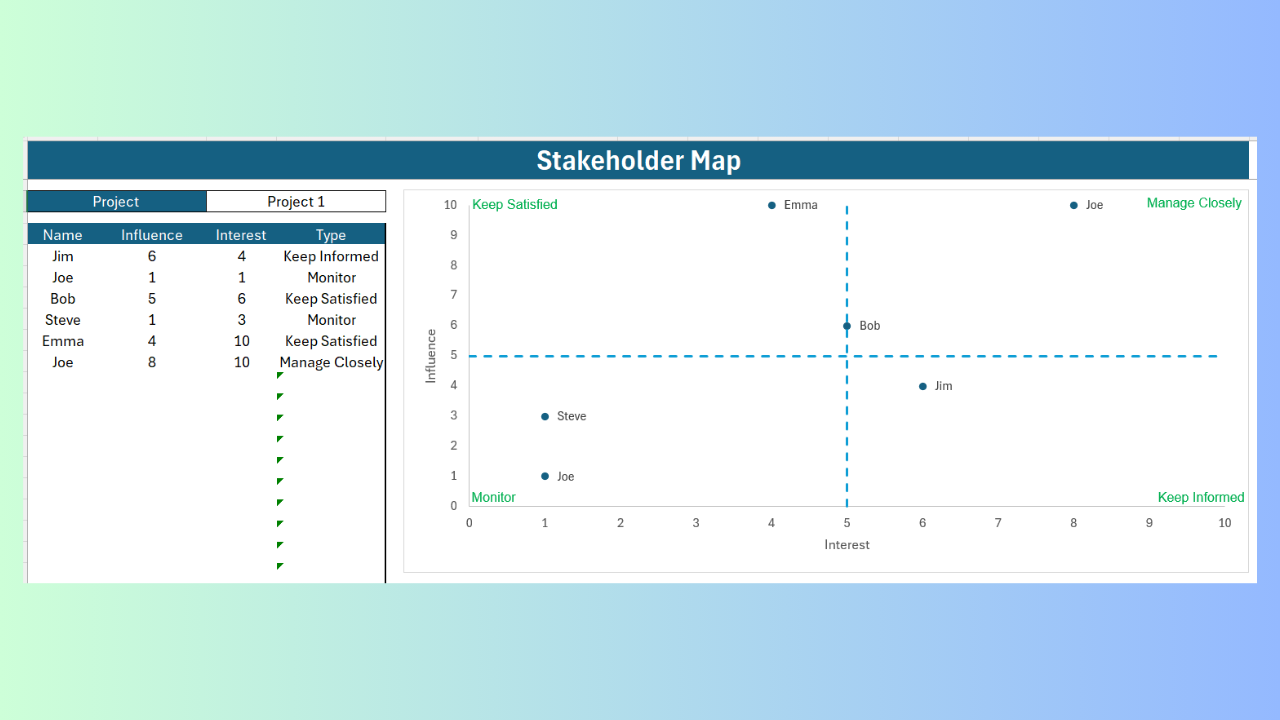
This is the exact stakeholder map from the video: a dynamic Excel quadrant chart that places every stakeholder automatically based on their influence and interest — no coding required.
Key Features
Interactive Stakeholder Matrix — Each stakeholder is placed automatically in the correct quadrant, based on an influence and interest score from 1–10.
Easy Data Input — Just type in the stakeholder’s name, influence score, and interest score.
Smart Data Validation — Only accepts integers from 1 to 10, so the chart always stays accurate.
Live-Update Scatter Chart — Stakeholders reposition automatically the moment you change a value.
Custom Labels & Gridlines — Clear quadrant lines (Manage Closely, Keep Satisfied, Keep Informed, Monitor) with dynamic name labels.
Automatic Stakeholder Type — A built-in formula classifies each stakeholder’s type based on their position on the chart.
Multiple Projects — Each sheet reflects its own project name, and duplicates easily for additional projects.
What’s Included
- One ready-to-use Excel workbook
- Pre-built interactive quadrant chart and data validation
- Instant digital download after purchase
- Email support for setup questions
Please note: because this is an instant digital download, all sales are final. We do not offer refunds — please review the system requirements below before purchasing.
Why Excel?
- One-time purchase — no subscription or monthly fees
- Works offline — no login or internet required
- No new software to learn — runs inside Excel you already have
System Requirements
- Microsoft Excel for Windows (desktop) — not compatible with Excel Online or Google Sheets
- Macros (VBA) recommended for advanced features — not required for core use
Perfect For
Project managers · Product owners · Consultants · Team leads · Strategy sessions and stakeholder reviews
Frequently Asked Questions
Is this a subscription?
No — it’s a one-time purchase. Use it for as long as you like.
Do I need to know VBA to use this?
No — VBA is optional for advanced customization only. The core chart works with standard Excel formulas and data entry.
Can I use this for multiple projects?
Yes — duplicate the sheet and rename it per project.
What if I need help setting it up?
Email support is included — reach out and we’ll help you get started.
Do you offer refunds?
No. Because this is an instant digital download, all sales are final. Please review the system requirements above before purchasing.
Not sure if this fits your needs? Reach out before purchasing — happy to help.
Thank you,
Elad
Reviews
There are no reviews yet.